InfoWatch V7.0

You are searching for a download? Click here to download latest available version of the app.
In case you lost the link to the paypal button to pay your fee, here it is. ;)
Yes, the app will cost small money - is subject to a fee. Anyway you will get a full featured license for at least one day free of charge – so give it a try.
Note: In case you’ve still paid your fee, it remains valid! No need to do anything. :)
Be aware that it's a hard work to develop such an app and a fee is a kind of 'thank you' for hundreds of hours the developer spend.
Functionality
Functionality


- Time and date service: The day, time, CW and date in nearly every language is shown. Currently up to 18 languages are supported.
Note: Maybe some translations are missing. But in case you provide your translation to me I will update the corresponding language resource file. It's also possible to add new language files. Don't hesitate and tell me what is missing. - Current weather service: The actual weather for a fixed or GPS determined location is shown. In addition the sunrise, sunset and expected sun duration of today is displayed.
- 3 hourly weather forecast service: The forecast is broken down into 3 hour steps of either today, today and next day or today and the next two days. It’s split into a sun information (e.g. temperature and expected sunshine duration) and a rain information (e.g. rain probability and amount).
Note: A detailed documentation of the weather forecast graphs can be found below tab "howto" or in the section "Weather Configuration" in the settings - press the corresponding "howto" button. - Daily weather forecast service: The daily forecast of the week is shown as sun information (e.g. temperature and expected sunshine duration) and a rain information (e.g. rain probability and amount).
- Feed service: Up to 3 feeds are configurable. You will get the latest news of up to 30 selectable preconfigured feeds or your own feed selection. RSS as well as ATOM feeds are supported.
- Calendar service: A configurable calendar view with public holidays support.
Note: I got a couple of questions, if the personal google/ apple calendar dates are supported too. The simple answer is: No. Why? The Javascript layer of the pebble app doesn’t provide any access to the calendar information. Due to this it’s technical not feasible. - Notification service: You can be informed every 15 minutes, every 30 minutes or every hour by a short vibration.
- Bluetooth info service: Get informed by a short vibration in case the Bluetooth connection gets lost.
Note: If you don't like it, you can deactivate it in the settings. But sometimes it's useful because you get feedback if you are going to lose your smartphone. ;) - Network service: In case errors occur during data transfer between smartphone and pebble, a corresponding message will be shown instead of the weekday text. In the same place you will get info if features are deactivated or time rules prevent information get send to pebble.
Note: Have a glance at the progress bar in the top of your screen, In case an "error" occurs it's drawn bold too.
HowTo
HowTo
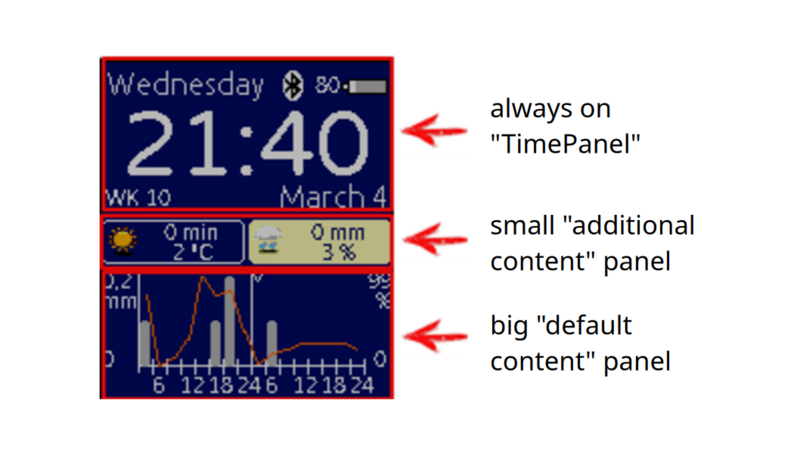


The Panels
Beside the always on "TimePanel" two further panels are provided: The middle panel is a small one (alias "additional content" panel) the bottom panel is a big one (alias "default content" panel).
The small "additional content" panel was intended as a static panel. You can choose between information such as course of the sun, news tickers, 3 hourly or daily weather forecast or a tiny calendar (with public holidays).
Note: In V5.0 a new y-axis twitch gesture was added (as expert setting) to the motion control. It can be used to change the shown "additional content" panel. Why? It simply enables you to increase news texts or spontaneously to have a glance to the sunrise info etc.. So what is static in a more and more moving world? ;)
The big "default content" panel at the bottom provides different and more detailed infos. Means it's a dynamic and fully configurable content layer. The content either changes (preconfigured) every 10, 30, 60 or 90 secs or by a more interactive motion control. In later case e.g. a simple turn of your wrist will switch to the next available info content.
Note: A detailed usage documentation of the motion control can be found in the section "Look and feel Configuration" - press the corresponding "HowTo" button.
The Settings
A settings dialog is provided in the pebble app. It offers a brunch of settings - nearly everything is configurable. In particular you can configure the "default content" switch duration (as "Info change frequency"), enable/ disable motion control, set your public holiday location out of 38 countries, select your individual shown language, favoured color scheme etc..
It’s worth mentioning that the availability of infos can be configured. Have a glance to the "Services Configuration" section for all properties in regard to this topic.
For example, you can enable/disable the calendar and/or the 3-hour/daily weather forecast. Additionally, you can set a time rule for when new information is loaded. The display of information can therefore be controlled for a specific time period, generally only for weekdays, all days, etc.
Note: Imagine you don’t want infos are reloaded during the night. Just define a corresponding time rule.
Note: In case you defined such a info time rule and you are out of the defined time frame a message "no info time" occurs. The property affects the availability of news, and public holidays - no surprise. ;) But weather is an exception and is independent of any time rule. It's always gathered from the internet.
In particular the weather configuration should be taken into account.
You have to select a fixed weather location because it's a fallback in case GPS can't locate you. To ease the configuration of your fixed location you can search either per name token or by GPS a weather station near to you.
Per default the GPS location is used to show an individual weather/ weather forecast. This can be disabled by enabling "Only fix location" in the settings. As a result only the configured fixed location is shown - your GPS location isn't used any more.
Note: You will find GPS options. Normally there is no need to change the options! Only in case your GPS can't reliable find your location, you can adapt the properties "accuracy", "timeout" and "cache time" of your GPS device appropriate.
Note: In case you want to change the "weather forecast switch duration" you have to change the "Info change frequency". Why? The "weather forecast switch duration" always equals to the half of the "Info change frequency".
Screenshots
Screenshots


